A wedding guest book with photos is any guest book where pictures sit next to the messages: instant prints taped onto pages, photos your guests upload from their phones, or a printed book built from both. The right choice depends on how much work you want on the day, how many guests you expect, and whether you want the finished result on a shelf, on a screen, or both.
Below are the six main approaches, what each one asks of you, and how to avoid the usual problems: missing photos, sticky pages, and a pile of files nobody ever sorts.

At a glance
- The classic option is a Polaroid-style book with an instant camera.
- Phone-based photo sharing through a QR code catches far more angles, including the ones from the dance floor.
- Collecting photos, videos, written notes and voice messages in one place beats a book with signatures alone.
Table of Contents
- The six main ways to make a wedding guest book with photos
- Photo guest book ideas that actually get used
- How to set up a photo guest book at the wedding
- Guest photo sharing: how guests send pictures
- Perspective: why we think the book should be built from more than photos
- Turning the collection into a keepsake
- Making a wedding photo book as a gift
- Our option: Digital Experience or Digital + Printed Book
- Which approach fits you?
- FAQ
- Sources
The six main ways to make a wedding guest book with photos
| Approach | Effort on the day | What you end up with | Best for |
|---|---|---|---|
| Instant camera and blank album | High | Real prints with handwritten notes | Small, hands-on weddings |
| Printed photo of the couple on a signature book | Low | Classic book, few photos from guests | Traditional ceremonies |
| Photo wall or board with clips | Medium | Loose prints to assemble later | Casual receptions |
| Shared online album | Low | A folder of files | Couples who’ll sort it themselves |
| QR-code digital guest book | Very low | Photos, videos, texts and voices, organized | Most couples, any size |
| Hybrid: digital collection plus printed book | Very low | Printed book and digital archive | Couples who want a keepsake |
Let’s go through each one honestly.
1. An instant camera and a blank album
This is the look most people picture: a guest snaps a Polaroid-style photo, tapes it into the book and writes a note beside it. It produces real objects with real handwriting, and guests tend to enjoy it.
The cost is logistics. Guides for this setup suggest roughly one camera per 40 guests, and warn that guests often take more than one shot, so film runs out faster than you’d expect (Liumy Albums). You also need double-sided tape or photo corners, pens, a table, and somebody to restock. And the photos you get are only the ones taken at that table, which usually means posed faces during cocktail hour.
2. A signature book with photos printed on it
Many stationers sell guest books where the couple’s engagement photos appear on the cover or first pages. The photos are yours, not your guests’. That’s fine if what you want is a beautiful object for people to sign. It’s less useful if you want pictures of the day from the people who were there.
3. A photo wall or board
Guests clip or pin prints to a board, and you assemble the book afterward. It’s low cost, but it creates a second job for after the wedding, and loose prints get lost between the venue and your home.
4. A shared online album
A shared folder is the simplest way to gather digital photos. The weak spot is the aftermath. You get hundreds of files in random order, with duplicates, sideways shots and no context. Turning it into a book means selecting, cropping and laying out every page by hand.
5. A QR-code digital guest book
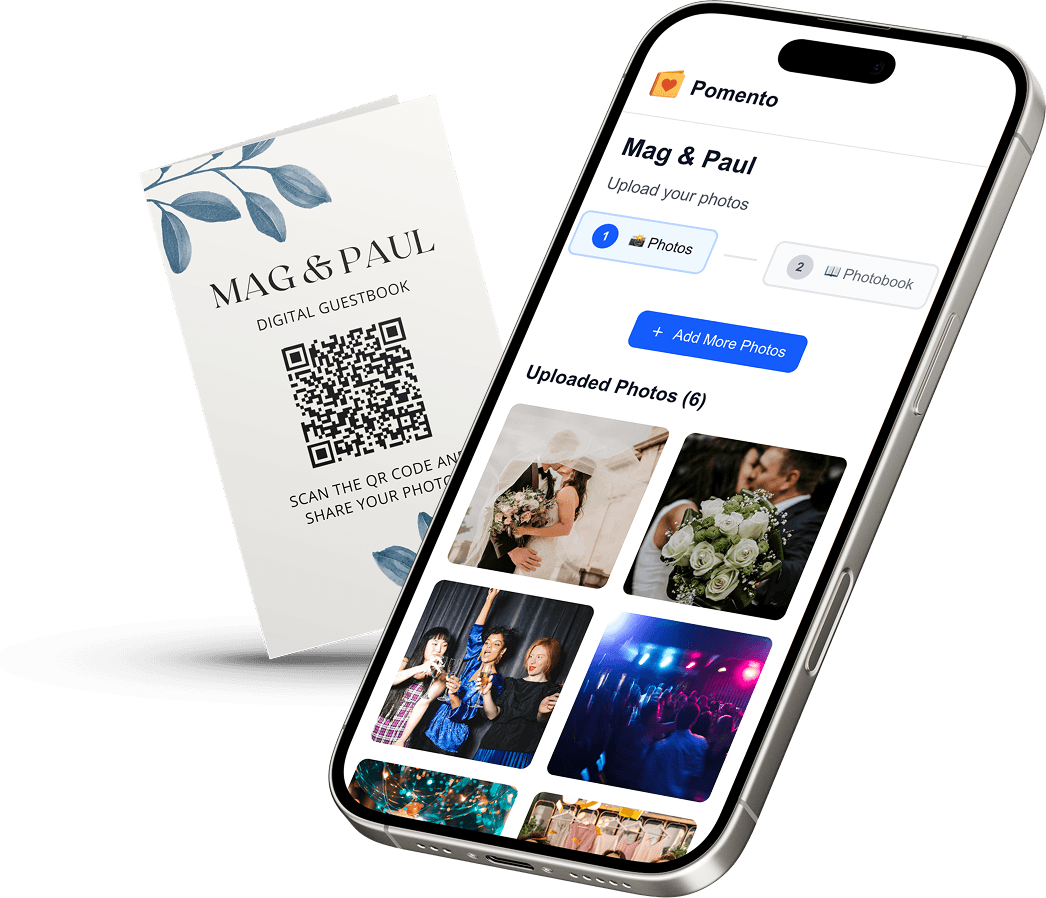
Here guests scan a code on a table card or sign, and a page opens in their phone browser. They upload photos, a short video, a written note or a voice message. The best versions need no app and no account, which matters when your guests include grandparents and your friends who never update their phones.
This is the approach that answers most of the wishes people have when they search for a photo guest book: it captures candid photos, it includes the messages, and the setup on the day is a stack of printed cards.
6. Digital collection plus a printed book
The most complete route is to collect digitally, then have everything laid out automatically into a printed photo book. You get the handwriting-style sentiment of messages, the candid photos, and a book on the shelf, without spending your honeymoon in layout software.
Photo guest book ideas that actually get used
The best ideas are the ones guests will do without being asked twice. A few that work:
- Prompt cards. Ask for something specific: “Your best advice for year one” or “Tell us about the first time you met us.” A prompt beats a blank page.
- Photo of the table. Ask each table to take one group photo and add a line about who they are. You get a tidy record of who sat with whom.
- Voice messages. A 20-second audio clip from a grandparent is often the most treasured item in the whole collection.
- Short videos. A toast you couldn’t hear because you were crying at the head table? Someone filmed it.
- Throwback photos. Invite guests to upload an old picture of you with them. These make the best pages in the book.
- Before and after. Let guests contribute in the days before the wedding and the days after, not just during the reception.
How to set up a photo guest book at the wedding
Whatever format you pick, the setup follows the same logic: make it visible, make it easy, and make it ask for something.
- Choose the spot. Put it where guests naturally pause: near the entrance, the bar or the seating chart. Not in a corner.
- Put it on every table. For a QR code, a card at each place setting or table center works better than a single sign, because guests scan while they wait for dinner.
- Keep instructions to one line. “Scan to add your photos and a message for us.” Nothing more.
- Test the code. Scan it from a few feet away, on both iPhone and Android, in the venue’s lighting. Check the venue’s Wi-Fi or cell signal too.
- Ask someone to announce it. Your DJ or emcee can mention it twice: once at dinner and once toward the end of the night.
- Mention it in advance. Add the link to your wedding website or a text to guests, so people can contribute from home.
- For physical books, give guests photo corners or double-sided tape rather than glue, and a pen that won’t smear.
Guest photo sharing: how guests send pictures
Guests will share in three ways, and a good setup handles all of them:
- On the day, from a phone. The QR code does the work. Pick a tool that doesn’t force an app download, since anything that adds friction cuts participation.
- After the day. People take photos all night and upload them the next morning. Leave the link open for at least a few weeks, and send one reminder.
- From other people’s cameras. Your photographer’s gallery is a separate thing. Guest photos are looser and funnier, and they cover moments the photographer wasn’t near.
One practical tip: tell guests that blurry or duplicate shots are fine. You can sort later, or better, let software do it.
Perspective: why we think the book should be built from more than photos
We built Pomento around a simple observation: the guest book is the one wedding item that everyone contributes to, yet it usually captures the least. A signature page tells you who came. It doesn’t tell you what they felt.
So we collect photos, videos, written notes and voice messages through a link or QR code, with no app and no sign-up for guests. We then turn the contributions into a finished digital book automatically, so hosts don’t crop pictures or fiddle with layouts. Each bundle also includes a personalized song and music video drawn from the messages, and a sorted archive of all the original files.
We think the sorting is the part couples underestimate. Collecting 400 photos is easy. Making them into something you’ll open again in ten years is the hard part, and it’s the part we automate. We also think payment should be plain: one payment, no subscription, no monthly fee for keeping your own memories.
Turning the collection into a keepsake
A guest book is only worth what survives. A few things to think about.
Include more than pictures. Wedding scrapbook guides suggest adding ephemera such as fabric swatches, pressed flowers, table numbers and handwritten vows for a more tactile record (The Knot). You can scan these items and add them to a digital book, or keep them in a box beside the printed one.
Mind the materials if you go physical. The Library of Congress notes that people often preserve personal memories with materials that harm them over time, including unstable plastics and harmful tapes or adhesives (Library of Congress). That’s a good reason to be wary of cheap tape and glue in a handmade album, and to ask guests to use proper photo corners.
Handle it less. The same guidance says limiting use is the best way to prevent damage, and that copies can reduce handling of a fragile original (Library of Congress). In practice: keep a digital copy you browse often, and a printed book you open on special occasions.
Back up the originals. Keep the sorted files in two places, such as a hard drive and cloud storage. A printed book is beautiful, but the originals are the real archive.

Making a wedding photo book as a gift
If you’re a parent, a bridesmaid or a friend organizing this for a couple, a few extra points apply.
- Start early. Ask guests to contribute before the wedding if you want the book ready as a first-anniversary or post-honeymoon surprise.
- Tell the couple only as much as you need to. If it’s a surprise, you can run the collection quietly and share the link with guests directly.
- Think about who’s in the book. Make sure older relatives and out-of-town guests have a simple way to add something. A voice message is easy for anyone.
- Choose format by recipient. Some couples want a book on the coffee table, others want a digital file to share with relatives abroad. Getting both avoids guessing.
- Check the budget honestly. Printed guest books from stationers vary widely, and the listings we found run from about $40 to well over $100 depending on size and customization. A single bundle price keeps the total predictable.
Our option: Digital Experience or Digital + Printed Book
If you’d like the photos, messages and voice notes collected and designed for you, Pomento does it from one link. Guests contribute without downloading anything, and you receive the finished guest book, a live slideshow option for the reception, a custom song and music video, and a sorted archive of every original file.
There are two options, both one-time payments:
- Digital Experience: $48. An interactive, downloadable digital version of your guest book plus the extras above.
- Digital + Printed Book: $87. Everything in the digital version, plus a high-quality printed photo book delivered to your door.
You can see both on the Pomento wedding guestbook page.
Which approach fits you?
- Under 50 guests and you love analog: an instant camera table works well. Budget for film and assign someone to keep it stocked.
- A larger crowd, or guests spread across tables and a dance floor: QR-code collection captures more of the day.
- You want a keepsake and no layout work: pick a digital collection that turns into a book automatically.
- You want both the feel of paper and the safety of a backup: combine a digital collection with a printed book.
FAQ
How many photos should a wedding guest book have?
There’s no fixed number. A printed book with a few hundred photos feels full, but quality matters more than quantity. Collecting digitally lets you gather everything and pick the best for print while keeping the rest in an archive.
Do guests need to download an app to share photos?
Not with the right tool. With a QR code or link, guests can open a page in their phone browser and upload straight away. Avoiding an app download or sign-up is the biggest factor in how many guests actually participate.
Can I include videos and voice messages as well as photos?
Yes, if the platform supports them. With Pomento, guests can add photos, videos, written messages and voice messages, and all of it ends up in the finished guest book and the sorted archive.
Is a digital guest book as meaningful as a printed one?
They do different jobs. A printed book is something you hold and put on a shelf. A digital version is easy to share with relatives far away and easy to back up. Many couples choose both, which is why we offer a digital bundle and a digital plus printed one.
When should guests upload their photos?
Let them upload any time, from before the wedding to a few weeks after. Put the QR code on tables for the day itself, and send a follow-up message the next morning, when most people have their photos ready.